Download CorelDRAW Graphics Suite for Mac — a top driver update tool
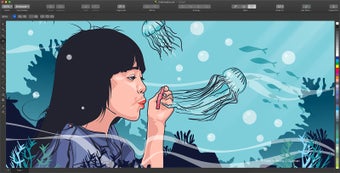
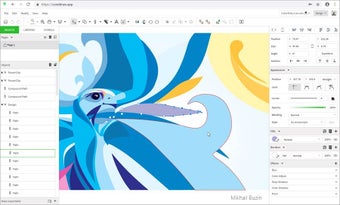
When you download CorelDRAW Graphics Suite for Mac, you receive a useful graphic design tool that you can use to create vector illustrations, edit photos, do document layouts, and more. CorelDRAW comes ready to use with over one thousand digital photos and hundreds of fonts, both TrueType and OpenType. Beyond that, you can access 150 templates, along with hundreds of fonts and vector options, enabling you to create almost anything.

Unlock your creativity with Adobe Stock
Get 10 images or 1 video with a free trial
Why download CorelDRAW Graphics Suite for Mac?
Versatile Graphic Design
With the CorelDRAW Graphics Suite, you get a wide-ranging toolkit that is useful no matter your medium. It includes CorelDRAW, for creating vector-based illustrations, and it also includes Corel PHOTO-PAINT, for pixel-based design work. And there are even more features:
- Corel CAPTURE can be utilized for screen capture anywhere on your screen.
- A robust set of features that can be customized to your preferences
- The redesigned asset manager helps you keep track of all of your files.
Whether you’re launching a business or building your portfolio, CorelDRAW Graphics Suite offers a variety of tools to create the professional images and documents that you need.
Expanded Exports and More
With the CorelDRAW Graphics Suite, you can now use the program to export files in various formats, including WEBP, CDR, CGM, BMP, and PSD, allowing you to create files that are accessible in other programs.
If you work with PDFs regularly, CorelDRAW has improved its text flow, editing options, and format preservation, making it a great option for editing PDFs. With a fifteen-day free trial, you can give CorelDRAW a try before committing to purchasing it, to assess how it suits your needs and which plan is best.
Key features of CorelDRAW Graphics Suite
Images, Documents, and More
Some users may be familiar with suites of graphics applications that separate various abilities into different programs, like the Adobe Illustrator. CorelDRAW stands out because it is a page layout design application, while also accommodating drawing and painting functionality.
CorelDRAW is great because while creating your documents and graphics, you can also utilize filter effects on bitmap images, create vector graphics from raster images and vice versa, and even more, all in one place.
Integration with Mac
CorelDRAW implements useful capabilities, such as the Print to PDF driver, which allows you to easily jump back and forth between print settings and creating PDF documents. Additionally, CorelDRAW’s Quick Look extensions can generate previews and thumbnails for CorelDRAW files on macOS Sequoia, making it easy to quickly scan the contents of files.
Interface updates to Painterly Brushes give fast access to recently used brushes and tools, streamlining your workflow. Updates to the Tilt Angle and Direction settings for brushstrokes create the effect of working with a pen, and the software has been updated to have superior stability and performance.
Implementing CorelDRAW Graphics Suite
To utilize CorelDRAW Graphics Suite, you’ll need to make sure that your Mac is updated with the correct software to install and run it.
Minimum System Requirements:
- macOS Ventura (13) or macOS Monterey (12), with the latest revision
- Apple M1, M1 Pro/Max, M2, Multicore Intel processor
- OpenCL 1.2-enabled video card with 3+ GB VRAM
- 8 GB RAM; 4 GB available hard disk space for application files, with a solid-state drive advised
- Minimum 1280 x 800 screen resolution, 1920 x 1080 recommended
- Mouse or tablet
- An Internet connection to install and authenticate CorelDRAW Graphics Suite and install all included software components and online features.
With CorelDRAW Graphics Suite, you can create branded signage and brochures, create images for your online presence or website, create original drawings and illustrations, and much more.
Paid and Subscription Versions
Multiple Tiers
CorelDRAW Graphics Suite offers both paid and subscription versions. Opting for the subscription means your application is always up-to-date with the latest features, top performance, and there is accessible technology support. You can opt for either a monthly or annual subscription option to take advantage of cost savings.
Opting for the one-time purchase means you own the software, which can be used for as long as you need. However, this version does not receive automatic updates, nor cloud-based tools and sharing, asset management, and access to the web or iPad apps.
Versatility of use
CorelDRAW Graphics Suite helps you manage a uniform style and apply a consistent format across multiple files, produce iterations, and format entire documents efficiently and quickly.
CorelDRAW also has the ability to process images with AI, so you can upsample or remove artifact features, further enhancing its imaging capabilities. As the Mac version was built for Mac, there is native support with Apple operating system releases, such as macOS Ventura and the Apple M1 and M2 chips.
New AI tools and enhanced design features
The latest update for CorelDRAW Graphics Suite introduces a dedicated AI Generate docker that changes how you work with complex images. Instead of spending hours on manual editing, you can use built-in generative AI to create new visuals from simple text prompts or remove backgrounds with a single click. There is also a helpful Remix Image feature that lets you swap out parts of a photo, such as changing a background or adding a new object, using models like Nano Banana and Stable Diffusion.
Design efficiency is also improved by the new Focus Mode, which lets you isolate a single object or group for editing. By bringing one element into focus, you can make detailed changes without the risk of accidentally moving other parts of your layout. This works perfectly with the PowerTRACE tool, which uses AI to clean up blurry images before converting them into sharp, editable vector graphics.
Beyond the AI features, the software has improved how it handles text through the Corel Font Manager. You can now browse and use over 1,400 Google fonts directly within the application without having to download and install them on your device. Additionally, the suite supports Variable Fonts, which allow you to manually adjust the weight and width of a font.
All-in-one creative powerhouse
Ultimately, CorelDRAW Graphics Suite serves as a comprehensive, one-stop hub for professionals who need a centralized environment for all their technical and creative design needs. Its robust features and steady performance make it a great fit for industries like signage, apparel design, and engineering. Choosing the subscription model is likely the better route if your workflow relies heavily on remote collaboration tools and the most consistent access to AI-driven enhancements.